
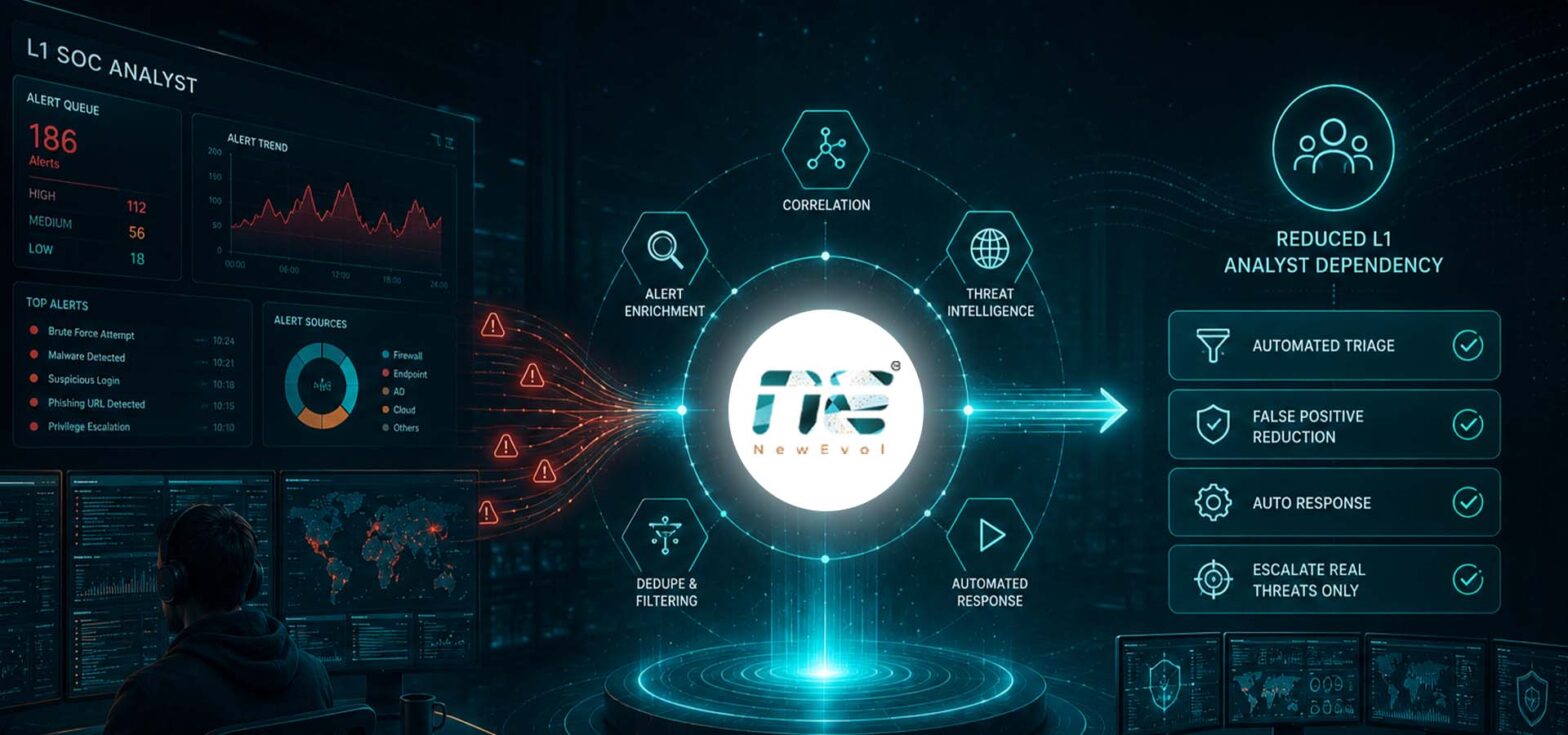
Security Operations Centers (SOCs) are under constant pressure to investigate more alerts with limited analyst resources. As organizations add cloud platforms, endpoints, applications, identities, and network infrastructure, the amount of security data that teams need to monitor continues to grow.
For Level 1 (L1) SOC analysts, this often means spending large portions of the workday on repetitive tasks. Reviewing alerts, checking IP reputation, gathering user information, validating events, assigning severity, and escalating incidents can consume valuable time before deeper investigation even begins.
Automation provides a practical way to reduce this burden. By automating predictable activities across alert triage, enrichment, prioritization, workflow orchestration, and response, organizations can improve SOC efficiency while allowing analysts to focus on investigations that require human judgment.
The objective is not to remove human analysts from the security process. Instead, automation creates a more efficient operating model where technology handles repetitive work, and security professionals concentrate on higher-value decisions.
Why L1 SOC Analysts Face Increasing Workloads
L1 analysts are typically responsible for the first stage of alert handling. They monitor security events, validate suspicious activity, gather initial context, and determine whether an event should be closed, investigated further, or escalated.
Common L1 activities include:
- Monitoring security alerts
- Validating suspicious events
- Investigating potential false positives
- Reviewing logs
- Checking threat intelligence
- Gathering user and asset information
- Categorizing incidents
- Assigning initial severity
- Escalating confirmed threats
- Following predefined response procedures
Individually, these tasks may appear straightforward. The challenge comes from performing them repeatedly across hundreds or thousands of alerts.
When analysts spend too much time on repetitive investigation steps, several problems can emerge. Alert fatigue can increase; important events may receive delayed attention, and experienced analysts may have less time for threat hunting or complex investigations.
This is where security operations automation can make a significant difference.
What Automation Means for SOC Teams
A SIEM collects and correlates security information from multiple sources. Automation adds another layer by determining what should happen after an event or alert is generated.
Instead of requiring an analyst to manually perform every step, automated workflows can execute predefined actions based on the characteristics of an event.
For example, when a suspicious login alert is generated, an automated workflow could:
- Collect the affected user’s identity information.
- Check the source IP against threat intelligence.
- Review recent authentication activity.
- Identify the affected device.
- Compare the activity against established rules.
- Assign an initial risk level.
- Create or update an incident.
- Escalate the event if predefined conditions are met.
The analyst receives a more complete incident rather than starting the investigation from an individual alert.
Automating Alert Triage
Alert triage is one of the most suitable areas for automation because many initial investigation steps are repetitive and predictable.
Automated alert triage can help security teams:
- Collect relevant event information
- Correlate related alerts
- Identify duplicate notifications
- Apply predefined rules
- Recognize known benign activity
- Assign an initial severity
- Route alerts to the appropriate workflow
Consider a SOC receiving multiple alerts related to the same endpoint. Without automation, an analyst may need to manually review each event and determine whether they are connected.
An automated correlation process can group related events and provide a unified view of the activity. This reduces unnecessary investigation and helps analysts understand the broader context faster.
The result is a more efficient first-level investigation process.
Automated Incident Enrichment
An alert rarely provides enough information for an analyst to make an informed decision. Additional context is often required.
Manual enrichment can involve switching between multiple security tools and data sources. Automation can bring this information together as part of the investigation workflow.
Relevant enrichment sources can include:
- Threat intelligence
- IP reputation
- Domain reputation
- User identity information
- Endpoint details
- Asset criticality
- Previous security events
- Vulnerability information
For example, an alert involving a suspicious IP address could automatically be enriched with reputation information and historical activity.
Similarly, a login anomaly could be associated with the affected user’s recent authentication history and device information.
By making this context available automatically, analysts spend less time gathering basic information and more time evaluating what the activity actually means.
Intelligent Alert Prioritization
Not every alert deserves the same level of attention.
A low-risk event on a non-critical asset should not necessarily receive the same priority as suspicious activity involving a privileged account or a critical business system.
Automated prioritization can consider multiple factors, including:
- Alert severity
- Asset importance
- User risk
- Threat intelligence
- Attack patterns
- Historical activity
- Potential business impact
This allows security teams to move from a simple, alert-driven model toward a more risk-focused approach.
For L1 analysts, prioritization provides a clearer starting point. Instead of working through alerts based only on when they arrive, analysts can focus on events that have a greater potential impact.
This can improve response speed while reducing the amount of time spent investigating low-value events.
Workflow Orchestration for Repetitive SOC Tasks
Many SOC processes involve several separate steps. An analyst may need to investigate an alert, query a threat intelligence source, check an endpoint, create a ticket, notify another team, and document the activity.
Workflow orchestration connects these steps into a repeatable process.
For example, a suspicious endpoint alert could trigger a workflow that:
- Retrieves endpoint information
- Checks related indicators against threat intelligence
- Searches historical security events
- Creates an incident record
- Assigns the appropriate priority
- Notifies the relevant security team
- Escalates the case when risk conditions are met
The analyst does not have to manually initiate each action.
This consistency is important because standardized workflows can reduce variations in how similar alerts are handled. It also makes security processes easier to document, monitor, and improve.
Automated Response Actions
Automation can extend beyond investigation and enrichment into predefined response actions.
Depending on the organization’s security policies and risk tolerance, workflows can support actions such as:
- Isolating a compromised endpoint
- Blocking a malicious IP address
- Blocking a suspicious domain
- Disabling a compromised account
- Sending security notifications
- Creating incident records
- Escalating critical events
However, not every response should be fully automated.
High-impact actions can have significant operational consequences. For this reason, organizations should define appropriate risk thresholds, approval requirements, and safeguards.
For lower-risk and highly predictable scenarios, automatic response may be appropriate. For complex or potentially disruptive incidents, the workflow can instead gather information and request analyst approval before taking action.
How Automation Reduces L1 SOC Analyst Dependency
The biggest opportunity is not eliminating L1 analysts. It is reducing the amount of repetitive work they need to perform manually.
Automation can handle predictable activities such as alert collection, enrichment, correlation, prioritization, and predefined workflow steps.
Analysts can then dedicate more time to activities that require human reasoning, including:
- Complex investigations
- Threat hunting
- Incident analysis
- Root-cause analysis
- Detection engineering
- Security improvement
- High-severity incidents
This creates a human-plus-automation SOC model.
In this model, technology handles the volume and repetitive processes while analysts provide judgment, investigation expertise, and decision-making.
The approach can also help organizations use experienced security professionals more effectively. Instead of spending skilled resources on routine alert processing, teams can direct their expertise toward improving detection capabilities and addressing sophisticated threats.
Key Benefits for Modern SOC Teams
A well-designed automation strategy can provide several operational benefits.
Lower Repetitive Workload
Automating routine checks reduces the number of manual steps analysts need to perform for each alert.
Faster Alert Triage
Automated correlation, enrichment, and prioritization can help analysts reach an initial decision more quickly.
Reduced Alert Fatigue
When low-value and duplicate events are filtered or grouped appropriately, analysts can focus on alerts that require meaningful investigation.
More Consistent Workflows
Predefined workflows help ensure that similar alerts follow consistent investigation and escalation processes.
Better Analyst Productivity
Analysts can spend more time on complex security activities instead of repeatedly collecting basic information.
Improved Scalability
Automation allows SOC processes to handle increasing alert volumes without requiring every additional task to be performed manually.
Faster Incident Response
When enrichment, notification, escalation, and approved response actions happen automatically, security teams can reduce unnecessary delays.
What to Look for in an Automated SIEM Platform
Organizations evaluating an automated SIEM platform should look beyond basic alert detection. The ability to automate what happens after detection is equally important.
Key capabilities to evaluate include:
- Intelligent alert correlation
- Automated enrichment
- Customizable workflows
- Threat intelligence integration
- Risk-based prioritization
- Automated response capabilities
- Case management
- Security tool integrations
- Audit trails
- Human approval controls
- Reporting and analytics
- Scalability
Integration is particularly important. Automation becomes more useful when the platform can work with the broader security ecosystem, including endpoint security, identity systems, threat intelligence, ticketing platforms, and network security technologies.
Organizations should also examine how easily workflows can be customized. SOC processes vary significantly between organizations, so automation should support business-specific requirements rather than forcing every team into the same operating model.
NewEvol and the Automation-Driven SOC Approach
NewEvol can be positioned as a modern SIEM platform that incorporates intelligent automation to help security teams streamline alert handling and improve SOC productivity.
The broader value of this approach is connecting detection with the actions that follow it. When alert triage, enrichment, prioritization, and workflows are integrated into security operations, analysts can work with better context and spend less time on repetitive processes.
For organizations evaluating such platforms, the focus should remain on operational outcomes: reducing manual effort, improving response efficiency, and enabling analysts to concentrate on higher-value security activities.
How to Start Automating L1 SOC Operations
Organizations do not need to automate every SOC process at once. A phased approach can be more practical.
Start by identifying tasks that are:
- Highly repetitive — activities performed frequently using the same steps.
- Predictable — processes with clearly defined conditions and outcomes.
- Time-consuming — tasks that consume significant analyst capacity.
- Low risk — processes where automation is unlikely to create major operational disruption.
- Easy to measure — workflows where improvements can be tracked.
For example, an organization could initially automate threat intelligence enrichment and alert deduplication. After validating the workflow, it could expand into prioritization, ticket creation, escalation, and selected response actions.
This gradual approach allows security teams to learn where automation provides the greatest value while maintaining appropriate human oversight.
Conclusion
Reducing L1 SOC analyst dependency does not mean removing people from security operations. It means making better use of their time.
By automating repetitive alert triage, enrichment, prioritization, workflow orchestration, and selected response activities, organizations can reduce manual effort and create a more efficient SOC operating model.
The most effective approach combines automation with human expertise. Technology can process large volumes of predictable activity, while analysts focus on complex investigations, threat hunting, incident analysis, and decisions that require experience and judgment.
For security leaders, the priority should be to identify where repetitive work is consuming analyst capacity and determine which processes can be automated safely. A carefully planned automation strategy can help SOC teams become more scalable, responsive, and focused on the security challenges that require human expertise.
Frequently Asked Questions
1. How does automation reduce L1 SOC analyst workload?
It automates repetitive tasks like alert triage, enrichment, correlation, prioritization, and ticket creation, allowing analysts to focus on complex investigations and high-value security work.
2. Can automation handle false-positive alerts?
Yes, it uses rules and context to filter benign activity and reduce noise, while keeping human review for uncertain cases.
3. Does SOC automation replace human security analysts?
No. It reduces repetitive work, but analysts are still needed for investigations, threat hunting, and decisions.
4. What SOC tasks should organizations automate first?
Start with simple, repetitive tasks like alert enrichment, deduplication, threat intel checks, ticket creation, and notifications.
5. How does automated alert enrichment improve incident response?
It automatically gathers key context (user, endpoint, threat intel, history), helping analysts decide faster.
6. What should organizations consider before implementing an automated SIEM platform?
Check alert volume, workflows, integrations, staffing, risk level, customization, reporting, and scalability.